



Using Quizzes as a Revision Technique
How Self-Marking Homework Works
Setting self-marking homework with Education Quizzes is quick and straightforward, and fits easily into existing homework routines.
Teachers select an individual quiz from a bank of pre-written content written by teachers. Content is organised by curriculum, subject and topic, allowing homework to be set quickly while keeping it clearly aligned to classroom teaching.
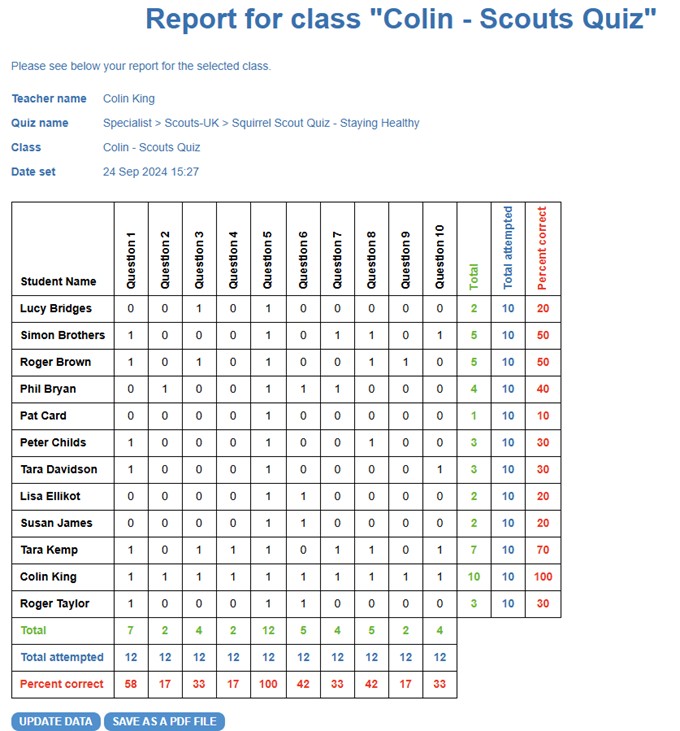
Pupils complete the homework independently online, with answers marked automatically as they progress and immediate feedback provided after each question. Once completed, an online report is generated automatically, allowing teachers to review completion and outcomes at both individual and class level without the need for manual marking.
Quick start guide: setting a quiz and viewing results
Set a Quiz (teachers only)
- Log in and navigate to any quiz on the site.
- Click Play, then Get Unique Quiz Code.
- Enter a class name and click Save.
- Make a note of the class name and quiz code provided.
Play the Quiz as a Student
- Go to www.educationquizzes.com/class.
- Enter your first name, last name and the quiz code.
- Click Click for Lift-Off to start the quiz.
View Reports (teachers only)
- Click Teacher Admin near the top of the screen.
- Select View Reports under The EQ Teacher Assistant.
- Click the quiz code to view results online or download a printable report.
You can set as many quizzes as you like, for as many students as you like. All results are saved automatically and can be viewed or printed whenever needed.
Benefits for Staff
Because feedback is provided automatically to pupils as they complete the homework, misconceptions are addressed at the point of response. This can reduce the need for additional correction or re-marking after homework has been completed.
Online reports can be viewed on screen or downloaded in a printable format, allowing teachers and subject leads to retain clear evidence of homework completion and outcomes. These reports can be used to support internal monitoring and, where required, provide evidence for external review without additional administrative work..
See an example of the homework report
This example shows the summary report generated automatically once homework has been completed.
Benefits for Pupils
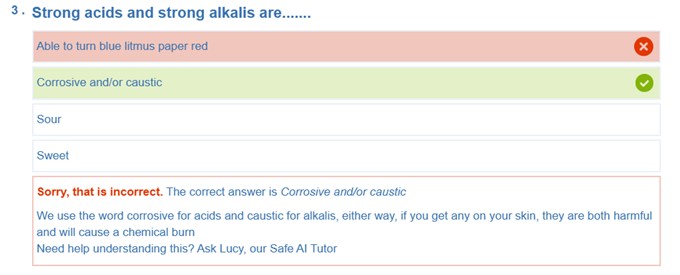
Pupils receive immediate feedback as they complete each question, confirming correct answers and providing short explanations where needed.
The quiz-based format supports regular, low-stakes checking of knowledge while keeping homework clearly focused on curriculum content.
See an example of question-level feedback
This example shows the feedback presented to pupils immediately after responding.
Value for Schools
Self-marking homework provides a consistent approach to setting and reviewing homework across classes and subjects.
This helps schools maintain high expectations for feedback and accountability while making better use of staff time and resources.




© Copyright 2016-2026 - Education Quizzes
Work Innovate Ltd - Design | Development |
Marketing
