SELF-MARKING HOMEWORK

You Set The Homework, We Do The Marking

Select an individual teacher-written quiz, generate a unique quiz code and share it with your pupils. They complete the quiz online, receive immediate feedback as they answer, and their results are recorded for teachers to review.

Self-Marking Homework is included with Tutor, Primary School and Secondary School subscriptions. You can set as many quizzes as you like for as many pupils or students as you like.

Teacher-written contentInstant pupil feedbackAutomatically saved reports
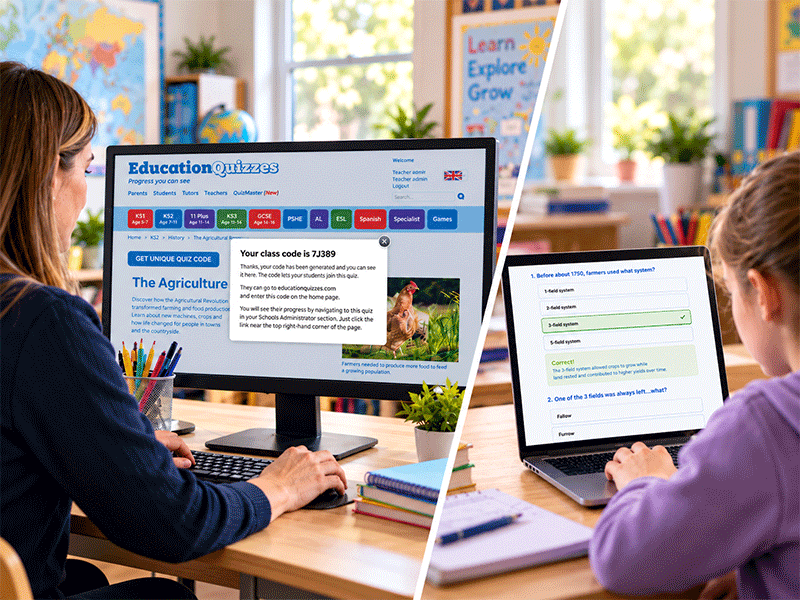
Teacher viewing an Education Quizzes homework class code while a student completes a quiz online
A unique code connects the set quiz with its homework results.

THREE SIMPLE STAGES

From Setting a Quiz to Seeing the Results

Follow the actual steps for assigning a quiz, completing it and opening the class report.

01

FOR STAFF SETTING HOMEWORK

Set a Quiz

Pick the topic and create a code for your class or group.

  1. Log in and navigate to any quiz on the site.
  2. Click Play, then Get Unique Quiz Code.
  3. Enter a class name and click Save.
  4. Make a note of the class name and quiz code provided.
02

FOR STUDENTS

Play the Quiz

Complete the homework independently, with feedback along the way.

  1. Visit educationquizzes.com/class.
  2. Enter your first name, last name and the quiz code.
  3. Click Click for Lift-Off to begin the quiz.
03

FOR TEACHERS

View Reports

Check outcomes on screen or save a copy to print.

  1. Click Teacher Admin near the top of the screen.
  2. Choose View Reports under The EQ Teacher Assistant.
  3. Click the quiz code to view results online or download a printable report.

You can reuse this process for any individual quiz, across different subjects and classes.

BENEFITS FOR PUPILS

Feedback While Learning Is Happening

Once they start the assigned quiz, pupils work through the teacher-written questions one at a time. They choose an answer and see whether it is correct before continuing.

Feedback appears as they answer, with a short explanation where needed to help them understand the topic rather than simply moving on from a mistake.

This gives pupils a manageable, topic-focused homework activity they can complete independently. Their completed answers are recorded for the teacher to review, without a separate worksheet to hand in.

WHAT PUPILS EXPERIENCE
1Open the Assigned Quiz

Open the quiz their teacher has assigned.

2Answer Each Question

Choose an answer and see the result straight away.

3Learn as They Go

Read the explanation when needed and continue through the quiz.

CLASS HOMEWORK REPORT

See How Your Class Answered Every Question

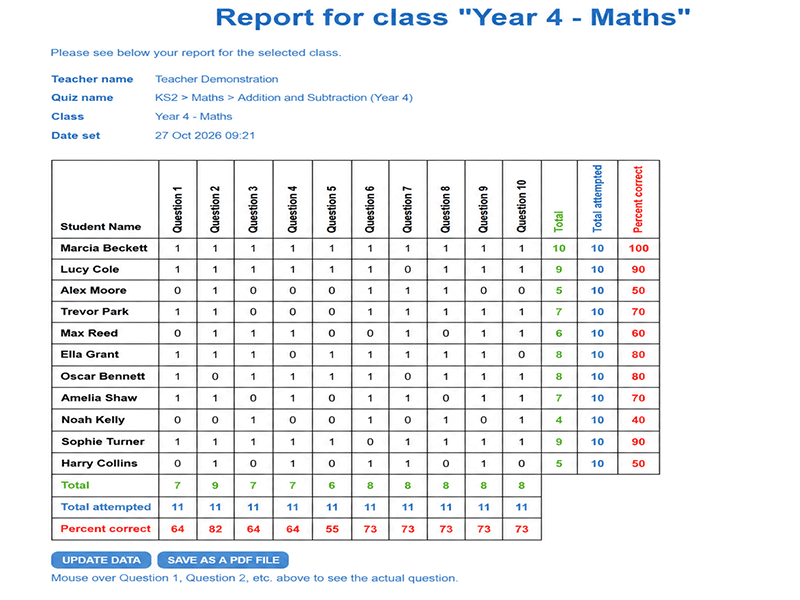
When pupils complete an assigned quiz, the results appear together in a class report. See each pupil's answers across the quiz, their overall total and percentage, and the questions the class found most difficult.

Read across a pupil's row to see individual performance, or look down the question columns to find areas the class may need to revisit.

The example shows how a single report brings the class together, so you can compare pupil outcomes and question-by-question performance without marking each submission yourself.

View the Full Class Report
Illustrative Year 4 Maths class homework report showing sample pupils, question-by-question scores, totals and percentages
Illustrative class homework report with demonstration results. Select the image to see it at full size.

BENEFITS FOR STAFF

Less Marking, More Time for Teaching

Once the assigned quiz has been completed, there is no stack of papers to mark. Answers have been checked as pupils worked, and the results are gathered into the class homework report.

You can use that record to spot individual pupils who need support, recognise questions that caused difficulty across the group and decide what to revisit in your next lesson or tutoring session.

Reports can also be viewed online or downloaded for teaching records, internal monitoring or review when required.

Turn the Report into Your Next Teaching Plan

  • Identify pupils who may need individual support
  • Find questions many pupils answered incorrectly
  • Plan a follow-up explanation or another focused quiz
  • Keep a printable record of completed homework

YOUR QUESTIONS ANSWERED

Self-Marking Homework FAQs

The essentials for getting homework set, completed and reviewed.

Who can use Self-Marking Homework?

It is included with Education Quizzes subscriptions for tutors, primary schools and secondary schools.

How do pupils open their assigned quiz?

Visit educationquizzes.com/class, enter a first name, last name and the quiz code, then select Click for Lift-Off.

Do I need to create or remember usernames and passwords for my pupils?

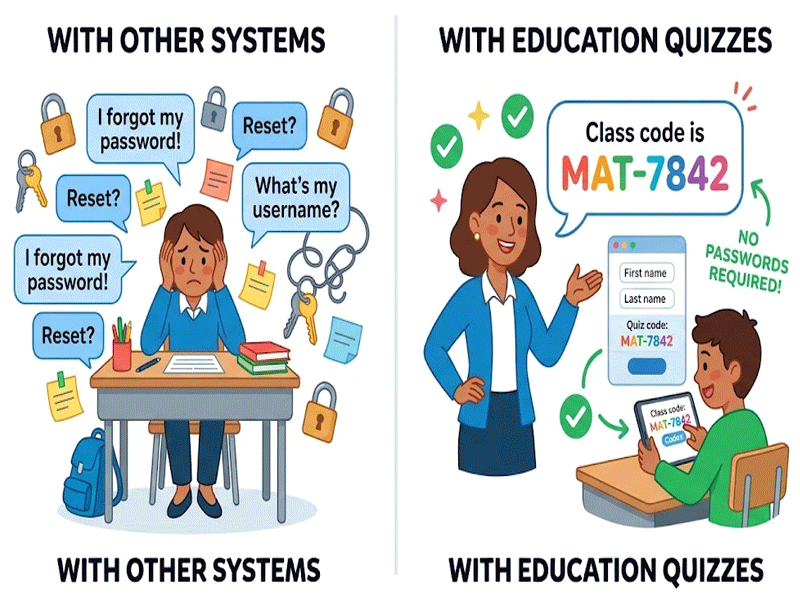
No. Pupils do not need individual usernames or passwords to complete Self-Marking Homework. They simply enter their first name, last name and the quiz code provided by their teacher at educationquizzes.com/class. The code connects their answers to the assigned homework, and their names appear on the class report. There are no pupil login details for you to create, remember or reset.

Can I choose exactly which quiz to set?

Yes. Select an individual teacher-written quiz organised by curriculum, subject and topic, then use Get Unique Quiz Code to set it as homework.

When do pupils receive feedback?

Each answer is marked as the pupil progresses through the quiz, with immediate feedback and explanations where needed.

Where do teachers find the homework results?

For teachers, click Teacher Admin, select View Reports under The EQ Teacher Assistant, then click the relevant quiz code.

Can I download a copy of the results?

Yes. Homework reports can be viewed online or downloaded in a printable format.

How many homework quizzes can I set?

You can set as many quizzes as you like for as many students as you like. Results are saved automatically.

Ready to use teacher-written quizzes for self-marking homework?

© Copyright 2016-2026 - Education Quizzes
Work Innovate Ltd - Design | Development | Marketing