Red
1 to 5 out of 10
There may be parts of this topic worth revisiting. Look back at the questions and try the quiz again when ready.
VISIBLE PROGRESS AND REPORTS
Traffic Lights give an instant sense of achievement when a quiz goes well and encourages another try when there’s room to improve. Seeing a result move from red to amber to green makes progress rewarding and gives learners a clear goal to aim for.
Quiz lists and reports make it easy to look back at scores, spot topics that need more practice and see improvement over time. Parents, tutors and teachers can follow progress and celebrate success without keeping separate records.
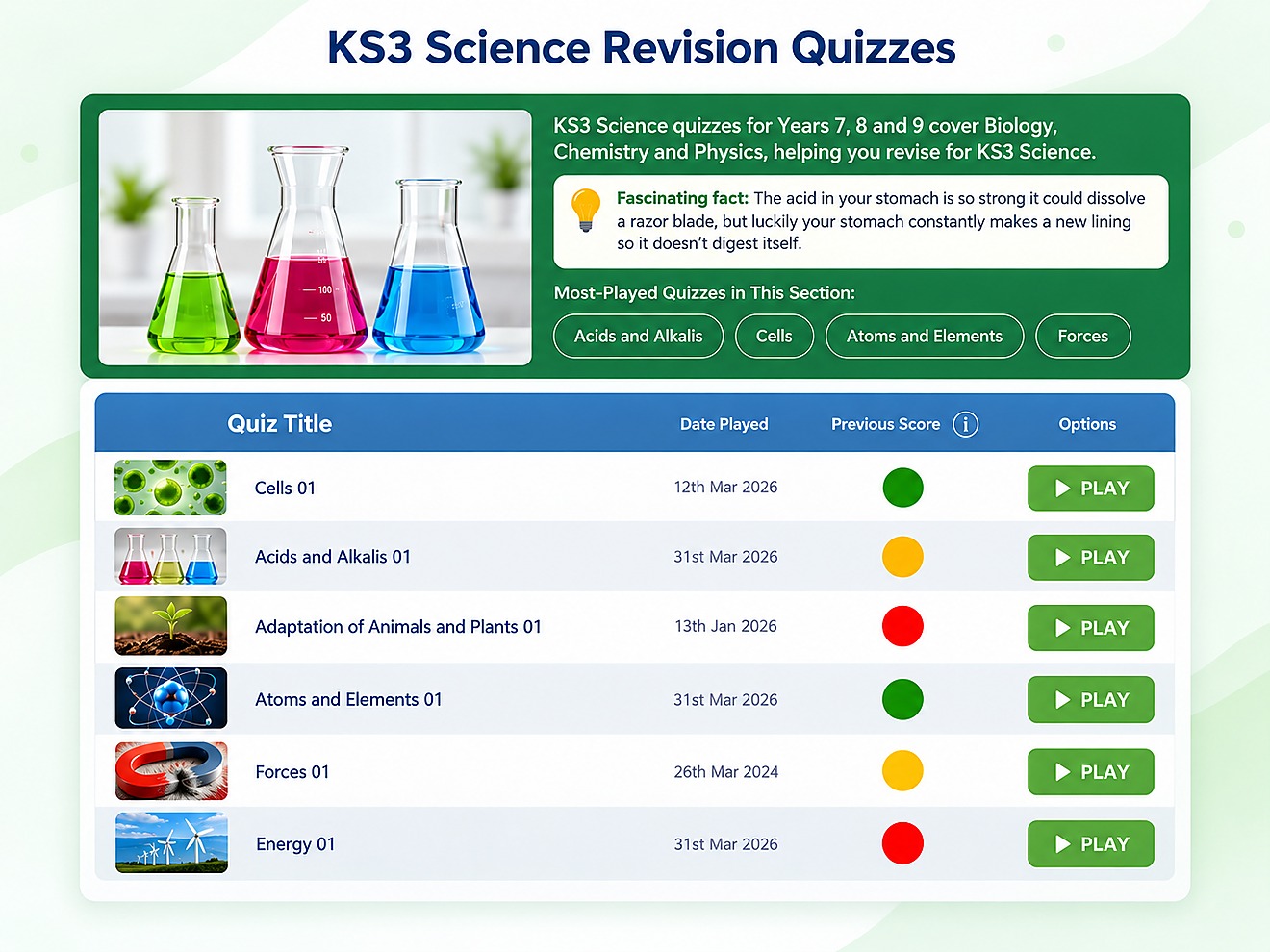
UNDERSTANDING THE COLOURS
Each Education Quizzes quiz has ten questions. The Traffic Light colour corresponds to the score achieved, making individual results easy to interpret without comparing learners against one another.
Worth remembering A Traffic Light describes the result of a quiz attempt, not a permanent judgement of someone's ability. When a quiz is played again, a new result can change the colour shown.
Here’s how to put those colours to work...
1 to 5 out of 10
There may be parts of this topic worth revisiting. Look back at the questions and try the quiz again when ready.
6 to 8 out of 10
A promising result with room for more practice. Revisiting the questions that were tricky can help strengthen understanding.
9 to 10 out of 10
A strong result on this particular quiz. The topic can still be revisited later to keep the learning fresh.
USING RESULTS TO PLAN PRACTICE
When there are lots of topics to cover, deciding where to begin can be difficult. Traffic Lights give learners a useful starting point by making results across individual quizzes easy to scan.
The colours do not create a revision plan on their own. They help you choose a manageable next step, concentrate on a topic that needs attention and return to it when you are ready.
Look for a red or amber result on a topic you are studying. Rather than revising everything at once, start with one area that could benefit from more practice.
Revisit the topic and spend a little time on the questions that were difficult. A clear, achievable task is easier to fit into a revision session.
Try the quiz again after practising. The new result gives you another snapshot of how that attempt went and helps you decide what to do next.
RESULTS BESIDE YOUR QUIZZES
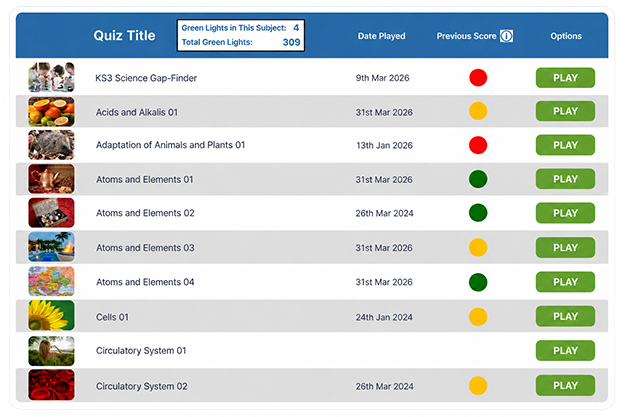
There is no need to open a separate report every time you want to check a quiz result. As the example shows, previous results can appear alongside the quiz titles in the topic list.
See which quizzes have been played, check the dates shown and return directly to a quiz for another attempt. This makes it straightforward to pick up where you left off.
A FULLER RECORD OF COMPLETED WORK
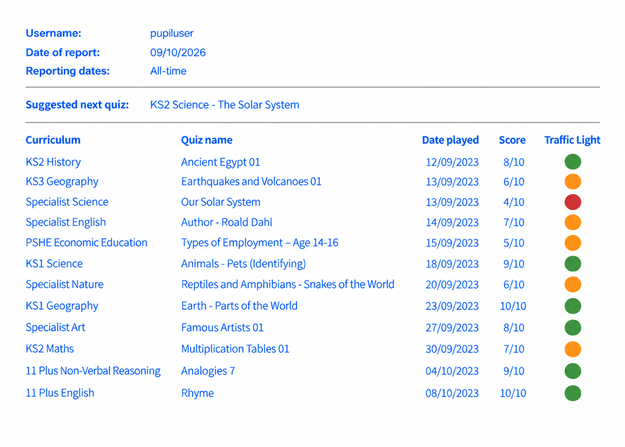
Quiz lists are useful for a quick check. Education Quizzes also offers dedicated reports that bring completed quiz activity together in one view.
Report views include Today, All Time and Custom Dates, so you can review recent work, see the full history or choose a particular period.
Check the quiz work recorded today.
Look back across a longer record of completed quizzes.
View quiz records for the date range you choose.
SUPPORTING LEARNING WITH REPORTS
Reports are useful for more than checking your own scores. Parents, tutors and school teachers can use the results and activity information available to their accounts to review work completed by the learners they support.
See which quizzes your child has completed and review the results available to you. It is a simple way to stay informed about their practice at home.
Check completed quizzes and recorded results between tutoring sessions, so you can see what has been practised and prepare the next piece of work.
Review pupil results and the class or homework reporting views available to your school, giving you a convenient record of completed work.
The reports and level of detail you can see depend on your account and the reporting options available to you.
EXPLORE QUIZZES BY SUBJECT
To find the quizzes you need, start by clicking a coloured curriculum button near the top of every page. Alternatively, you can explore by specific subjects by clicking below.
MORE WAYS TO LEARN
Quiz results are one part of learning. Explore teacher-written questions, engaging challenges and extra support.
 Teacher-Written Quizzes Explore thousands of curriculum-based questions, with ten questions per quiz and helpful explanations to support learning and revision.
 QuizMaster Challenges Make revision more engaging with QuizMaster Solo or Teams, using curriculum questions for individual and group challenges.
 Lucy AI Tutor When an answer needs more explanation, optional AI Tutor Lucy offers topic-focused help, with controls for parents and teachers.
 Additional Support Explore reading colour filters, printable quizzes, useful links and practical learning resources for different needs.
COMMON QUESTIONS
Clear answers about Traffic Light scores, previous quiz results and Education Quizzes reports.
Traffic Lights show the score achieved on an individual ten-question quiz. Red means 1 to 5 correct answers, amber means 6 to 8 and green means 9 to 10. They help learners identify topics they may want to revisit.
Previous quiz results can appear beside the quiz titles in Education Quizzes topic lists, together with the date played and a Traffic Light indicator. You can also open the available dedicated reports to review completed activity.
Yes. Education Quizzes automatically checks answers as learners complete a quiz and records the result. Learners receive feedback explaining answers, while quiz lists and reports make completed work easier to review later.
Yes. Dedicated Education Quizzes report views include Today, for quizzes completed that day, and All Time, for looking back across a longer record of completed activity. The available views depend on the account.
Parents can review the quiz results and activity information available through their Education Quizzes account. This helps them see which topics their child has practised and choose what to revisit together.
Tutors can check recorded quiz activity between sessions and use the results to choose follow-up practice. School teachers can review the pupil, class or homework reporting views available to their school. Access varies by account and permissions.
Yes. A learner can revisit a topic and take a quiz again. A later attempt may receive a different Traffic Light colour if the score changes. A colour describes a quiz result, not a learner's overall ability.
Not quite. A quiz result shows how one quiz attempt went, often with a Traffic Light beside the quiz title. Dedicated reports bring recorded quiz activity together, so you can review work across a selected period, such as Today or All Time.
Ready to make revision easier to follow? Explore our quizzes, see results as you go and choose the option that suits you.
© Copyright 2016-2026 - Education Quizzes
Work Innovate Ltd - Design | Development |
Marketing